I type in Dvorak
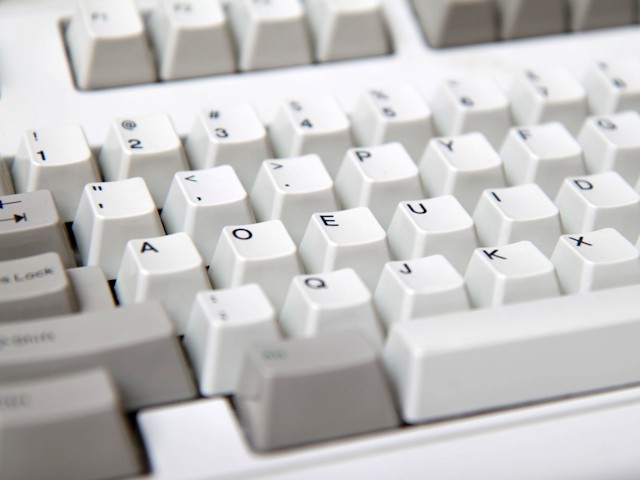
When I type on my computer, I don’t use the standard QWERTY keyboard layout that everybody else uses – instead I use the Dvorak layout. What is this? Why do I do it? And what is the experience like? Read on to find out.
(This article is written in a quasi-interview/FAQ format, where the reader asks questions and Nayuki gives answers.)
- How are the keys arranged?
-
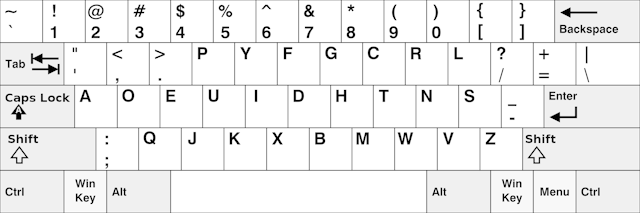
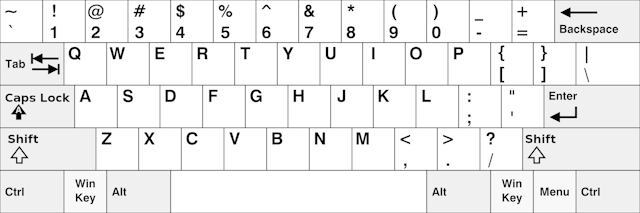
To begin on the same page, here are maps comparing the two keyboard layouts:
We can see that the letters and punctuation are rearranged, but the numbers and modifiers are unchanged.
- Is Dvorak better than QWERTY?
-
Well, yes and no. The only disadvantages of Dvorak stem from its lack of popularity. QWERTY’s strong network effect means that people are trained to type on QWERTY by default and expect QWERTY equipment to be ubiquitous. Because essentially everyone learns QWERTY before becoming aware of alternatives and being able to make an informed choice, it means they need to suffer a frustrating low-productivity period (I estimate about a month) when retraining to another layout.
The advantages of Dvorak are numerous. Your fingers travel less because a far higher percentage of keys are typed on the home row. For example, the typical English text is typed with 60% of keystrokes on the home row on Dvorak, compared to 30% on QWERTY. I personally find that typing feels smoother and flows better due to the reduced finger movement. And you might type faster from moving your fingers less, although I wouldn’t guarantee it because there are other factors involved in typing speed. All in all, Dvorak is a rationally designed keyboard layout for fast, comfortable typing, and using it is just the right thing to do. If we didn’t have QWERTY so entrenched already, then it would be best to train everyone on Dvorak as their first and only keyboard layout.
- Why do you type in Dvorak?
-
I consciously choose to type in Dvorak because I strongly believe that it’s a better-designed keyboard layout than QWERTY. Having the most common English letters on the home row and reducing finger movement simply makes sense. I do a lot of typing every day (mostly for chat), and using Dvorak increases my productivity and comfort. And maybe I do this to prove how much of a geek I am. 😛
- Do you type faster?
-
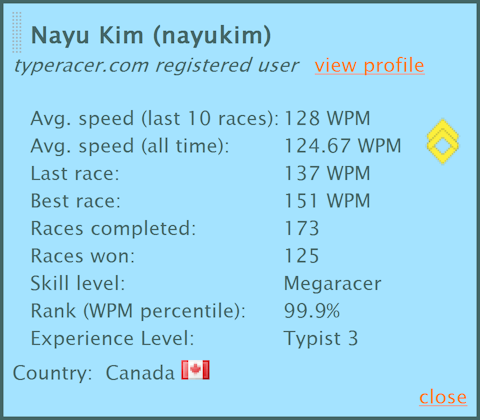
My stats at TypeRacer
Yes. I was a rather fast QWERTY typist to begin with, regularly reaching 80 WPM. After getting fluent in Dvorak, my typical typing speed went up to about 100 WPM. (Note: 1 word = 5 characters, including space and punctuation.)
But being able to type quickly is not simply expressed in a single number. You see, everyone types fastest when copying text directly – reading with eyes and regurgitating with fingers. I showed that I can copy text at a sustained speed of 120 WPM on Dvorak.
I rarely type for the sake of copying text (being a human OCR is not my job); I have to type while thinking and reasoning. For example, I have to express my ideas and compose sentences on instant messaging or email. And for example, I have to read, analyze, skip back and forth, etc. when writing program code. In these more complicated real-world situations, the typing speed advantage I get from Dvorak compared to QWERTY is probably small or negligible. Fair to say, Dvorak definitely does not harm my typing speed compared to QWERTY, and that’s good enough a reason for me.
- What’s it like to switch from QWERTY to Dvorak?
-
In summary, it’s a long, tiring sacrifice of a few months. The one-time cost of switching is the only major downside of using Dvorak. It takes a lot of discipline and perseverance to overcome this barrier, but in my own case I know it was well worth it, and now it pays off literally every day.
I am a heavy computer user who types lots of text – instant messaging, email, documents, program code, keyboard commands, and more. When I started Dvoraking full-time in , my typing speed dropped significantly – it felt like walking in mud versus running on pavement. All the text that I had to type in my everyday work took an excruciatingly long time. On the other hand, I think because I had to type so much, my learning process was faster than if I had only practiced Dvorak part-time.
Quantitatively speaking, my QWERTY typing speed was about 80 WPM when I started switching to Dvorak, and I was typing QWERTY for roughly 7 years (ever since childhood). I Dvoraked for about a month at slow speeds like 10 WPM. Then I Dvoraked for a month or two at modest speeds like 40 WPM. So if you switch to Dvorak, that’s how long you can expect to take to get up to speed.
- Do you need a special keyboard?
-
Nope, for a number of very good reasons. I use a software approach to map the Dvorak layout onto ordinary QWERTY keyboards, which is entirely satisfactory already. Hardware Dvorak keyboards are niche products, making them difficult to find and relatively expensive to buy. And I’m very satisfied with the main keyboard that I use – the Microsoft Internet Keyboard Pro, with its USB ports and multimedia hotkeys – and it’s hard to find any other keyboard with these convenient features that I depend on.
- How can I try typing in Dvorak?
-
To get introduced to the Dvorak keyboard, I highly recommend reading this entertaining and informative web comic: The Dvorak Zine.
You can try out the keyboard layout online here (without installing or configuring anything on your computer): KeymanWeb Live.
For long-term typing, you don’t need to go out and buy a Dvorak keyboard. (In fact I recommend against this even for established Dvorakers.) What you do need to do is add the Dvorak keyboard layout in software. Look in your operating system’s configuration, in the section regarding regional settings / internationalization / keyboard / input methods.
After the software configuration, you should follow a typing tutorial and try to memorize the arrangement of the keys as soon as possible. I recommend the self-guided tutorial A Basic Course in Dvorak (ABCD). After that, simply type, type, type. Do all your chats, emails, shortcuts, passwords, coding, etc. in Dvorak.
- How do you type on other people’s computers?
-
I would type using QWERTY. After all, I had been a decent QWERTY typist for about 7 years before switching to Dvoraking full time. But with my muscle memory trained to type in Dvorak now, I feel very “tongue-tied” or “dancing with two left feet” when going back to using QWERTY. To my surprise, when I actually measure my QWERTY typing speed, it’s about 70% of my Dvorak speed, despite the awkward feeling I get when typing.
Another category of “other people’s computers” is computers that are not owned by me but are given to me for long-term use – for example, a workplace computer. In these cases, I simply set the Dvorak keyboard layout on the computer and continue my business as usual, which is allowed because usually the computer is exclusively for my use.
- How do other people use your computers?
-
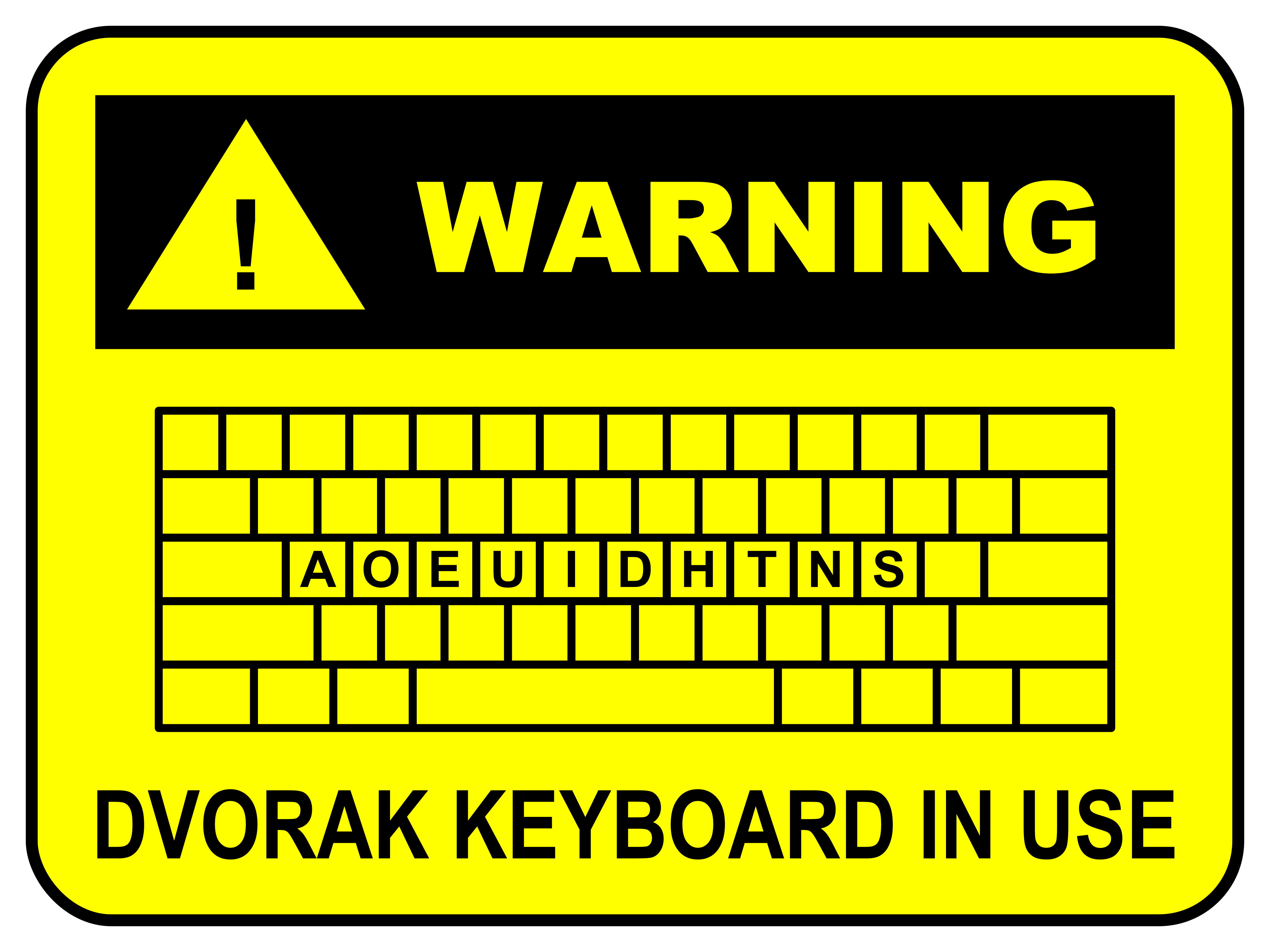
This is the only other problem that remains once you’re typing fluently in Dvorak. I would have to explain to people that I use a different keyboard layout, then show them where the keyboard layout switcher is. On Microsoft Windows before 8, it was especially annoying because the layout is per-application-instance instead of global, so different application windows can have different layouts (e.g. one window in QWERTY and the rest in Dvorak). On other systems (Linux, Windows 8+, Android, etc.) it’s possible to switch the keyboard layout globally, which is less effort and easier to understand.
- How do you handle keyboard shortcut commands?
-
I type all keyboard shortcuts natively in Dvorak. I heard that some people don’t want to relearn keyboard shortcuts and want to keep using them in their QWERTY positions, but I think this is a bad idea because it introduces a conceptual inconsistency. One thing that might be jarring at first is the fact that Ctrl+X/C/V (cut/copy/paste) are no longer adjacent, but from experience I can firmly say that it’s not a problem in practice. So other than the changed hand positions, I find that typing keyboard shortcuts on Dvorak has no ergonomic or learning problems at all.
Interestingly because many keyboard shortcuts have the letter on the right side of the Dvorak keyboard, I find that I usually press Right Ctrl with my left thumb, press the letter key (e.g. C/S/T/V/W/Z) with my left pinky, and have my right hand on the mouse. This makes the Right Ctrl key critically important, which unfortunately many laptops omit due to their utter lack of respect for the classic full keyboard layout. Contrast this situation with QWERTY, where the most useful keyboard shortcuts are invoked with the left pinky on Left Ctrl and the left index finger on A/C/S/V/W/X/Z.
- There are a bunch of layouts named Dvorak. Which specific variant do you use?
-
I use and only use US English Dvorak. I have not learned the layout of the mostly similar classic Dvorak layout, which has the number row and punctuation rearranged, nor the ANSI version (slightly different punctuation). And I am completely untrained in the left-handed and right-handed Dvorak layouts.
Aside: I’m very thankful that ANSI Dvorak retains the QWERTY order of the numbers and punctuation in the number row. These characters are relatively rarely used such that even if they were reordered optimally (whatever that may be), the benefit would be negligible in practice. Moreover, the dedicated number pad is faster and more comfortable for typing long sequences of numbers.
- What about Colemak, Arensito, etc.?
-
There are other optimized keyboard layouts out there like Colemak (year ), Arensito (year ), et cetera. I didn’t choose these for a couple of reasons: When I first started learning an alternative layout around year , Dvorak was well-known but these other ones weren’t; this makes sense given that Dvorak was introduced in . Colemak tried to reduce changes from QWERTY whereas Dvorak started with a clean slate, and Dvorak emphasized more on hand alternation. And Dvorak is just much more widely supported (across operating systems, mobile devices, etc.), whereas software for Colemak etc. usually needs to be downloaded manually.
- Separate retraining
-
I found that when I switched from QWERTY to Dvorak, I had to retrain separately for each “class” or genre of typing activity. By this, I mean training in one class did not make me better in another class. The classes that I personally noticed were the following: English text, punctuation-heavy programming code (e.g. Java), keyboard shortcuts (e.g. Ctrl+X/C/V), and random letter sequences (e.g. manually copying Base64 text).
- Hunt-and-peck Dvoraking
-
I am a touch typist and use the F/J bumps for positioning when putting my hands on the keyboard. But when I tested the completely blank Das Keyboard Ultimate, I realized there are times when I must look at the keyboard before hitting a key; using the blank keyboard turned out to be inconvenient for me. I’ve memorized the mapping of QWERTY key labels to Dvorak keys at an intuitive level, so I can look at the physical QWERTY keyboard (“hunt”) and use that to guide me to type in Dvorak (“peck”). So it goes without saying that I don’t bother to buy a native Dvorak keyboard or relabel an existing QWERTY keyboard with stickers or by rearranging keycaps (possible on some but not all keyboards).
My most common reason for looking at the key labels is that my hands are off the keyboard but I need to press just one or two keys and then leave the keyboard again. An example of such a situation is manipulating audio/video playback; I don’t keep my hands on the keyboard while listening/
watching, but still need to issue occasional commands like seek back / seek forward / volume / full screen. I would recommend others to follow my approach of keeping QWERTY key labels because having a Dvorak-labelled keyboard comes with a temptation to hunt-and-peck for regular typing instead of forcing memorization and touch typing. When learning, it’s okay to show the Dvorak layout beside the keyboard or on the screen, because you still have to think about how to map the layout diagram to your fingers, without the labels easily being on the keys themselves.
- Fixing weird fingering
-
I noticed that many people don’t use all four fingers on each hand to type. For example, I’ve seen someone who types with three fingers on each hand and not use their pinkies. I think this happens because he improvised his own typing method, or during typing lessons he ignored the recommended finger-to-key mapping.
Excluding actual physical disabilities, I don’t think anything prevents these people from using the standard typing technique. So for them, retraining to the Dvorak layout provides an excellent opportunity to learn the proper, efficient fingering method (while using Dvorak).
- Typing on mobile devices
-
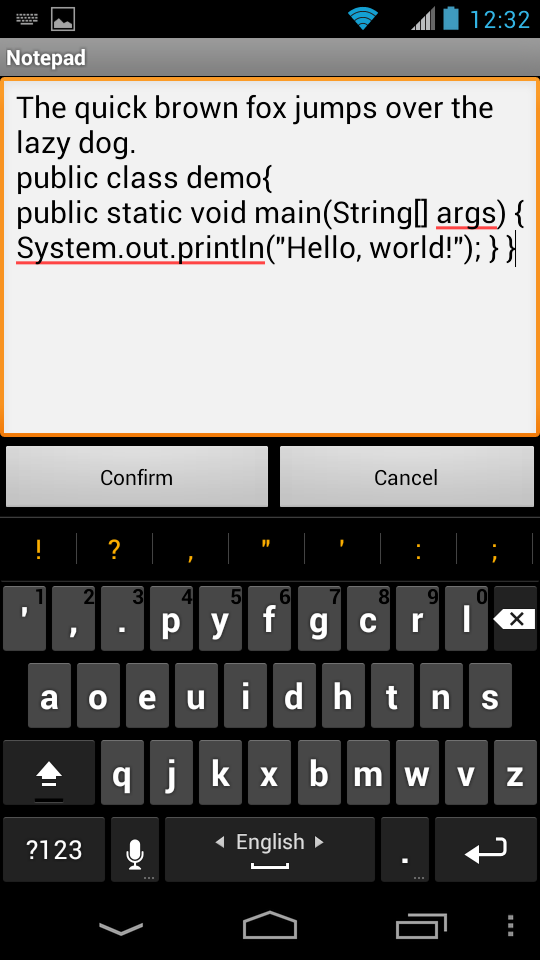
Typing on smartphones and tablets can be quite a different experience from that on desktops and laptops. The keyboard is usually virtual, so typing is a matter of tapping on a flat slab of glass with no key ridges or tactile feedback (though Android has key-press vibration). Smartphones inherently have small keyboards, so I can only use one finger (index or thumb) from each hand. On an iPad in landscape mode, I can lay all 4 fingers of each hand on the home row.
Even though the kinesthetic experience is different (and it’s not clear that Dvorak is better in this situation), I still found QWERTY to be awkward because I am very accustomed to the letter positions of Dvorak. I’m a light mobile user, and on average I would type maybe 1000× as many keystrokes on desktop than on phone. I don’t want to complicate my life by using a second keyboard layout that I dislike and hardly type any text on. Luckily Android comes bundled with a Dvorak layout, so I switched to it, tested my performance and comfort on sample text, and have been happy ever since.